Audio-optical adapter 3.5 mm + tulips/toslink to 3.5mm jack/RCA
Audio-optical adapter 3.5 mm + tulips/toslink to 3.5mm jack/RCA
SKU: 3472
In stock
Ships within 1–2 business days
Couldn't load pickup availability
| Warranty 12 months. Return or exchange within 14 days → | |
| Delivery Nova Poshta to branch/locker or courier to your address → | |
| Payment Pay on delivery or prepayment → |
Description
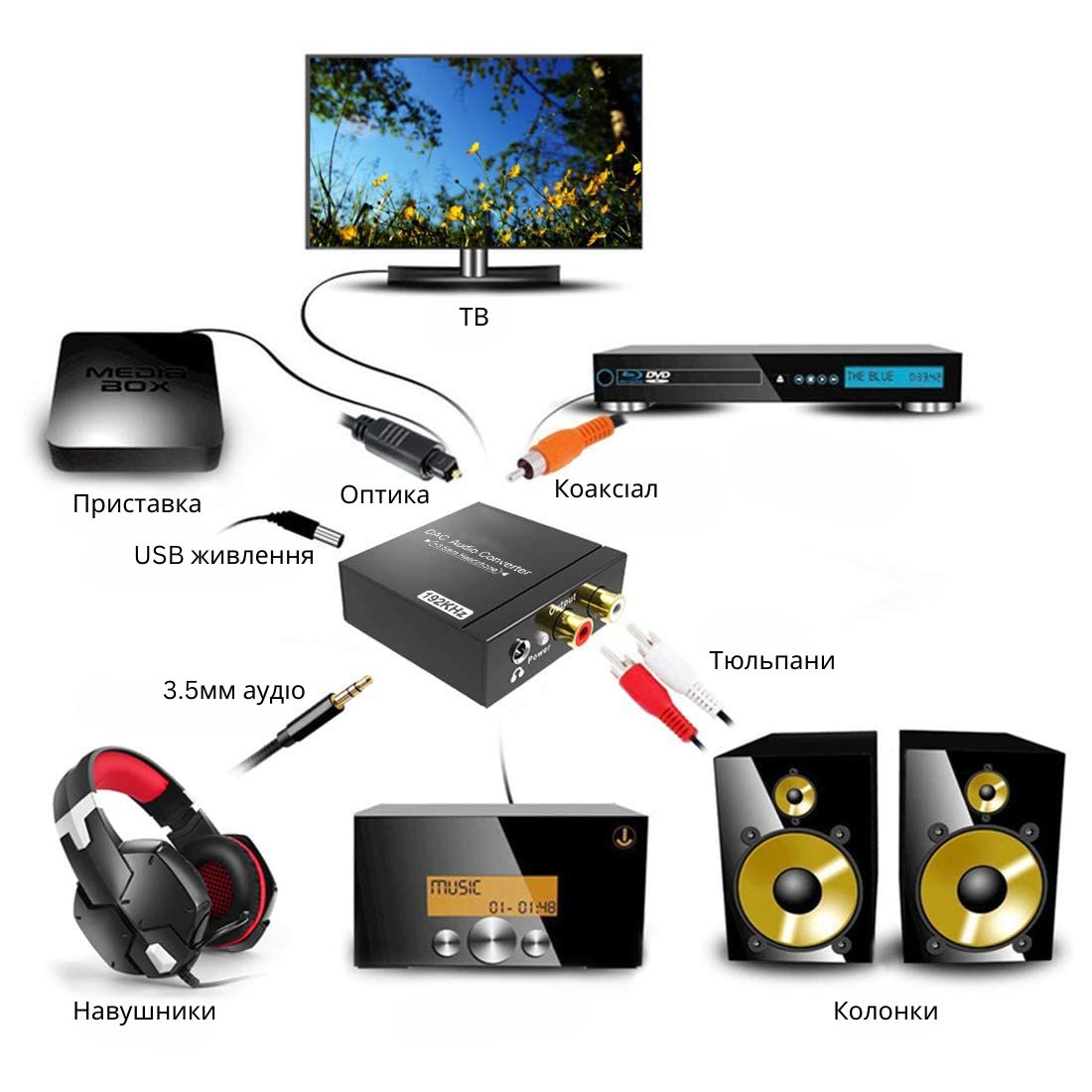
This Digital to Analog Audio converter is a solution for connecting your TV to a sound system, music center, or headphones. It converts a digital audio signal from an optical or coaxial output into high-quality analog sound of the "RCA" or "3.5mm headphones" type.
- Input: 1 x Toslink, 1 x RCA (coaxial)
- Output: RCA L / R audio (stereo - "RCA") and 3.5mm for headphones
- Sound Quality: Provides high-quality sound with support for sampling rates of 32, 44.1, 48, and 96 kHz, as well as a 24-bit S/PDIF stream on left and right channels.
Package contents:
- 1 * Analog to Digital Audio Converter
- 1 * Optical cable 1 meter
- 1 * USB power cable
Thanks to USB power:
- Convenient connection without the need for a power adapter; the device turns off when the TV is turned off, saving energy
Connection instructions:
- Remove the caps from the optical cable.
- Connect the optical cable to the converter and TV jacks.
- Connect the power cable to the converter and any USB port.
- Connect the audio cable to the R/L jack or the headphone jack.
- Important! Set the TV's audio output mode to PCM or LPCM
Description
This Digital to Analog Audio converter is a solution for connecting your TV to a sound system, music center, or headphones. It converts a digital audio signal from an optical or coaxial output into high-quality analog sound of the "RCA" or "3.5mm headphones" type.
- Input: 1 x Toslink, 1 x RCA (coaxial)
- Output: RCA L / R audio (stereo - "RCA") and 3.5mm for headphones
- Sound Quality: Provides high-quality sound with support for sampling rates of 32, 44.1, 48, and 96 kHz, as well as a 24-bit S/PDIF stream on left and right channels.
Package contents:
- 1 * Analog to Digital Audio Converter
- 1 * Optical cable 1 meter
- 1 * USB power cable
Thanks to USB power:
- Convenient connection without the need for a power adapter; the device turns off when the TV is turned off, saving energy
Connection instructions:
- Remove the caps from the optical cable.
- Connect the optical cable to the converter and TV jacks.
- Connect the power cable to the converter and any USB port.
- Connect the audio cable to the R/L jack or the headphone jack.
- Important! Set the TV's audio output mode to PCM or LPCM